Free supplier search
Have a product photo? Ask for free supplier contacts.
Seen a product you like but do not know its supplier? Upload a clear image or screenshot first. Share any brand reference, model name, SKU or Yupoo link on WhatsApp. Explore matching China product options, then request supplier contact details free through ReplicaChina. We do not sell products.
Any brand or model name identifies the buyer reference only. ReplicaChina does not claim brand affiliation, provenance, permanent inventory, or fixed pricing.
- Image first
- No product name required.
- Photo match
- Matching options and related alternatives.
- Free contacts
- Request supplier contact details on WhatsApp.
Last updated: 2026-09-20 · Reviewed by the ReplicaChina sourcing team
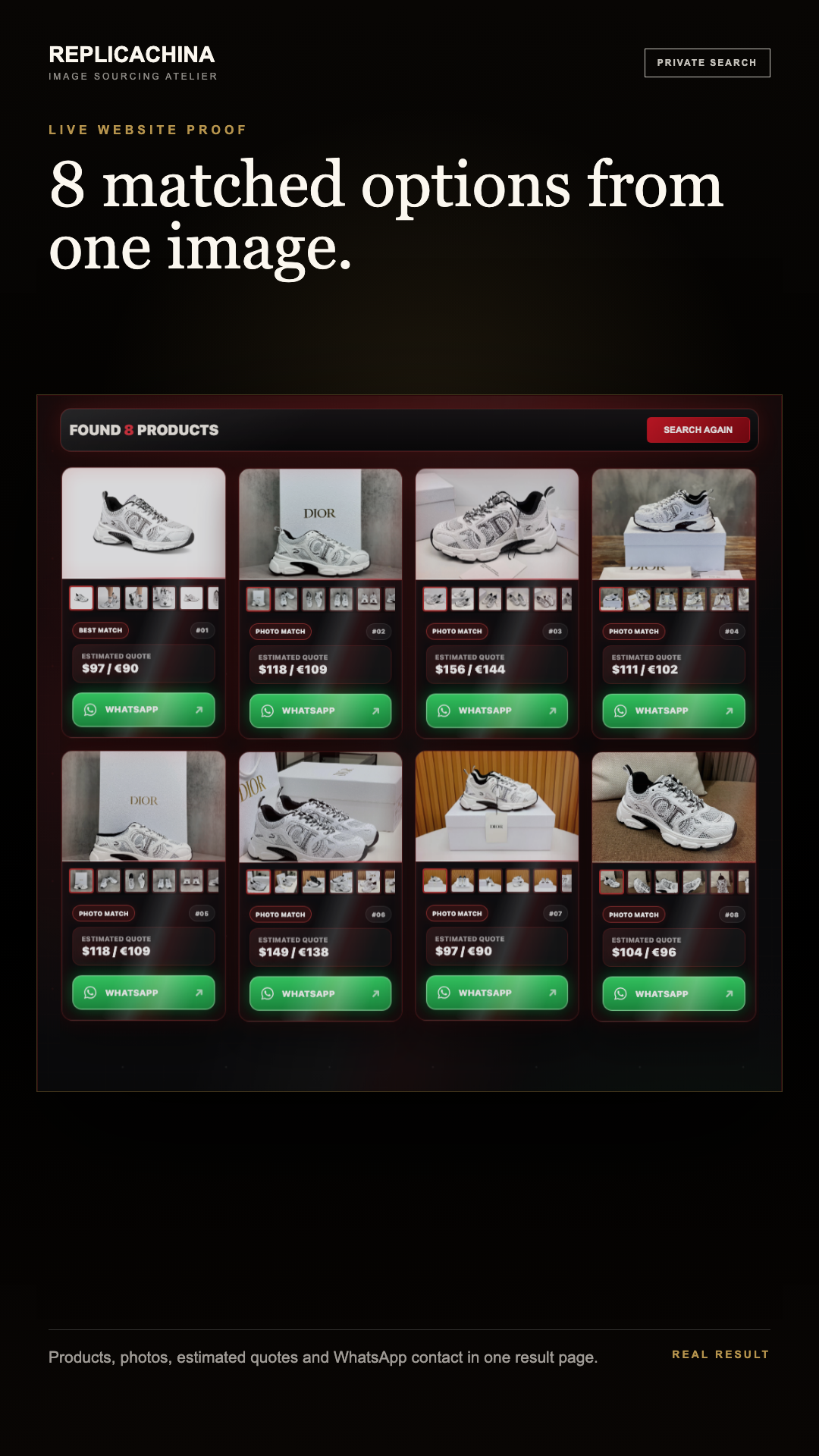
Direct answer: To find a Yupoo product by image, use Yupoo's image search when the album owner has enabled and synchronized it. If that search is unavailable, upload the product image or screenshot; share the Yupoo link on WhatsApp. ReplicaChina finds China suppliers by photo. Request free supplier contacts via our WhatsApp entry. We do not sell products.
How to compare a Yupoo supplier quote from a photo
A photo can start a Yupoo supplier comparison, but it should not be treated as a supplier endorsement or a current offer. Keep the same uncropped product image, album or item URL, variant, quantity, destination, and acceptable differences for every option. Then compare the current reference photo, exact-or-alternative label, stock confirmation, item price, shipping basis, payment route, returns, and final payable amount in writing.
Yupoo is an album and catalog platform, so an image result is a reference rather than proof that an item is currently available or ready to purchase. Buyers still need to confirm the selected product, supplier option, size, color, quantity, quality level, destination country, shipping route, and final payable price.
How Yupoo image search works
Yupoo's image-search help page says the feature can search similar pictures in the user's own or another user's online album. The album owner must first enable image search, and historical images need to finish synchronizing before they can be searched.
- Open the relevant Yupoo album or catalog.
- Use the camera icon when image search is enabled, then upload the clearest uncropped product image.
- Open the closest image result and keep its album link, selected image, product code, or model note.
- If image search is unavailable or the result has no order details, send the saved image or product photo using our ReplicaChina photo upload page.
- Review the AI-matched supplier options and indicative prices.
- Request free supplier contacts on ReplicaChina’s WhatsApp. Check the selected option, price, payment and shipping with the supplier.
Yupoo image search or supplier sourcing?
| Method | What it searches | Useful result | What remains unconfirmed |
|---|---|---|---|
| Yupoo native image search | Images inside enabled and synchronized Yupoo albums. | Visually similar image and its source album. | Current stock, supplier identity, price, quality level, ordering, and shipping. |
| Yupoo text search | Album names, image names, and category names. | Relevant catalog sections when the buyer knows the right words. | Whether the result matches a screenshot when names are incomplete or different. |
| ReplicaChina AI photo sourcing | Product photo or album screenshot. Share a Yupoo link, SKU or model note on WhatsApp. | Matching product options and related alternatives, with listed reference prices to compare for sourcing. | Buyer discussion with the supplier: size, color, quantity, quality level, availability, destination, route, payment and final payable price. |
What to send when a Yupoo item cannot be found
- The original Yupoo album or product-page link
- A clean screenshot showing the full product, not only a small detail
- Extra front, side, sole, hardware, texture, label, or size-tag images when available
- Any SKU, model name, album title, image filename, color, or size note
- Quantity, quality priority, destination country, and whether a close alternative is acceptable
Important service boundary
Yupoo links, screenshots, product names, and album images are buyer-provided sourcing references. ReplicaChina does not claim affiliation with Yupoo or an album owner, and a visual match does not by itself confirm stock, authenticity, seller identity, price, or purchase terms.
Explore the Yupoo search guides
Start with the Yupoo search intent guide when the input is a keyword, album URL, item code, photo, seller clue, product category, platform comparison, or transaction-safety question. Its related guides connect the full Yupoo search, category, comparison, and buying-check cluster.
From Yupoo reference to free supplier contacts
Use the photo upload page with a clear image, check matching product options, and request supplier contacts free through ReplicaChina. Confirm product details, price and fulfillment with suppliers.
Related photo sourcing guides
- Find products by photo
- China photo search supplier
- China supplier price quote
- Luxury-style bags and accessories
- Luxury bag seller options for United States buyers
- Luxury bag seller options for European buyers
- Luxury bag supplier China
- Sneaker photo search supplier
- Nike-reference seller options for United States buyers
- Nike-reference seller options for European buyers
- Yupoo photo search supplier
- How to order by photo
- Shipping, payment, and WhatsApp support
- Photo search examples and quote checklist
- Screenshot product sourcing
- Instagram similar-style photo search
Free supplier search
Have a product photo? Ask for free supplier contacts.
Seen a product you like but do not know its supplier? Upload a clear image or screenshot first. Share any brand reference, model name, SKU or Yupoo link on WhatsApp. Explore matching China product options, then request supplier contact details free through ReplicaChina. We do not sell products.
Any brand or model name identifies the buyer reference only. ReplicaChina does not claim brand affiliation, provenance, permanent inventory, or fixed pricing.
- Image first
- No product name required.
- Photo match
- Matching options and related alternatives.
- Free contacts
- Request supplier contact details on WhatsApp.